
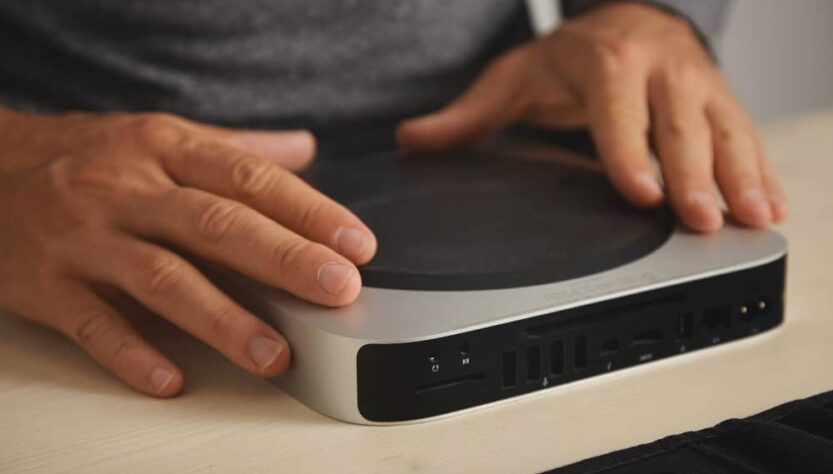
Yes, a mini PC can run from a power bank, provided that the power source can deliver the voltage, current, and USB-C Power Delivery profile the computer expects. A bank rated for 65W is not automatically compatible with a 65W mini PC because the system may need a specific 19V or 20V input, a proper PD negotiation signal, and enough headroom for short startup spikes.
The most reliable arrangement is a mini PC with native USB-C PD input connected to a laptop-class power bank through a correctly rated cable. A mini PC with a barrel connector or a USB-C-shaped fixed-voltage socket may also work, but it usually needs a PD trigger cable, the correct plug and polarity, and sometimes a regulated step-down converter. Read on before connecting anything, because a connector that physically fits can still expose the computer to the wrong voltage.
Key takeaways:
- A mini PC with native USB-C PD input is the safest and simplest option for battery power.
- A 65W label does not guarantee successful startup because voltage negotiation and transient power limits also matter.
- A PD trigger can request 20V from a power bank for a fixed-voltage mini PC, but the adapter must match the computer electrically.
- Runtime depends on watt-hours, conversion losses, workload, connected displays, and the power bank’s behavior under changing load.
Can You Run a Mini PC on a Power Bank?
Yes, you can run a mini PC on a power bank if the complete power chain is compatible. That chain includes the bank’s output profile, the cable, any trigger or converter, the input socket, and the computer’s peak demand. Matching only the advertised wattage is not enough.
A mini PC that consumes 15W during light work may still use a 65W adapter because its processor, SSD, memory, USB devices, and cooling fan can create brief peaks during boot or heavy workloads. A battery bank that handles a steady 15W load but reacts slowly to a 38W or 70W spike may shut down before the operating system starts.
This setup is useful for several practical scenarios:
- keeping a small workstation alive during a blackout or brownout,
- running a travel computer with a hotel television or portable monitor,
- offloading photos and video files during field work,
- powering a compact server, router, or development environment away from an outlet,
- building a portable computing rig where the display is selected separately.
How Does USB-C Power Delivery Affect Compatibility?
USB-C Power Delivery determines whether the power bank sends the voltage the mini PC needs instead of the default 5V supply. The connector itself does not make a port PD-compatible. USB-C describes the physical interface, while USB PD provides the communication used to select a higher-voltage power profile.
A compatible source and sink exchange information before high-voltage power is enabled. Common profiles exposed by laptop power banks include:
- 5V for basic USB devices,
- 9V for phones and smaller electronics,
- 12V on some banks and adapters,
- 15V for tablets and compact computers,
- 20V for laptops and many higher-power devices.
Without a compatible PD sink or trigger, the bank normally remains at 5V. That is why a 65W power bank can appear completely dead when connected to a mini PC that expects 19V. It may be capable of 20V at 3.25A, yet it will not provide that mode unless something requests it correctly.
USB PD 3.1 also supports higher-voltage Extended Power Range profiles and can reach up to 240W with compatible hardware. Those modes do not solve a 19V compatibility problem by themselves. A mini PC designed for a fixed 19V input still needs the right conversion path.
Why Does a 65W Power Bank Sometimes Fail to Boot a 15W Mini PC?
A 65W power bank may fail because the mini PC never negotiates 20V, draws a startup spike above the bank’s limit, or triggers a protection reset. Average consumption tells you how much energy the system uses over time, but startup reliability depends on short-duration electrical behavior.
From my testing, the most common failures occur before sustained load becomes relevant. The computer starts to initialize, the processor boosts, attached USB devices wake up, and the bank detects either excessive current or an unsupported negotiation state.
Typical causes include:
- No PD negotiation: the bank stays at 5V because the mini PC has a fixed-voltage input rather than a true PD sink.
- Insufficient current at 20V: a 65W system may require at least 3.25A, while some ports provide less at the selected voltage.
- Transient overload: the bank cuts output when a startup or CPU boost spike exceeds its protection threshold.
- Underrated cable: a cable limited to 3A cannot carry a 20V, 5A profile needed for 100W operation.
- Port redistribution: a multiport bank briefly interrupts output when another device is connected, disconnected, or renegotiated.
- Automatic low-load shutdown: some banks turn off when the mini PC enters a very low-power state.
For a 65W mini PC, a 100W bank often provides better headroom than a 65W model. The computer may never draw 100W continuously, but the higher-rated bank is less likely to trip during short peaks. Use a 5A e-marked USB-C cable when the selected profile can exceed 60W.
Is 20V Safe for a Mini PC Rated at 19V?
20V may work with many 19V mini PCs, but it should not be treated as universally safe without checking the allowed input range. The difference is about 5.3 percent, and real adapters and power banks also have their own voltage tolerances.
Some mainboards accept 20V without any visible problem because their input regulators were designed with margin. Others may run hotter, age faster, behave unpredictably under load, or fail if the actual output rises above its nominal value. A USB-C-shaped socket labeled 19V is especially risky because it may be only a fixed-voltage connector with no PD negotiation circuitry.
There are three sensible approaches:
- Use the manufacturer’s supported input: this is the lowest-risk option and preserves the intended electrical conditions.
- Use a regulated buck converter: request 20V through a PD trigger, then reduce it to a stable 19V with a converter rated above the expected current.
- Use a diode drop only with proper engineering checks: a high-current diode can reduce voltage, but the drop changes with current and temperature, and the component must dissipate heat safely.
A regulated converter is usually preferable to a single diode because it holds the output closer to the target across changing workloads. Verify polarity before connecting a barrel plug, and never assume two visually identical USB-C power inputs are wired or controlled in the same way.
What Hardware Do You Need for a Reliable Setup?
You need a compatible power bank, a correctly rated cable, and either native USB-C PD support or a properly configured trigger and conversion adapter. The exact parts depend on how the mini PC receives power.
| Power Method | Required Hardware | Reliability | Main Risk |
|---|---|---|---|
| Native USB-C PD input | PD power bank and a cable rated for the required wattage | High when the manufacturer’s power profile is supported | Peak load may exceed the bank’s output limit |
| PD trigger to barrel input | 20V trigger, correct barrel plug, correct polarity, and optional step-down converter | Medium when every electrical parameter is verified | Wrong voltage, polarity, connector size, or trigger profile |
| Fixed-voltage USB-C-shaped input | Model-specific adapter or custom trigger cable with verified wiring | Variable because the port may not follow USB PD rules | Physical compatibility can hide electrical incompatibility |
| AC-output battery station | Battery station and the original mini PC power adapter | High for compatibility | Higher weight and conversion losses |
Before buying a power bank, check these values on the mini PC’s original adapter:
- output voltage, such as 19V or 20V,
- maximum current, such as 3.42A,
- maximum power, calculated as voltage multiplied by current,
- connector type and dimensions,
- barrel polarity or supported USB-C PD profiles.
Then check the power bank specification for the output of one specific port. A bank advertised as 100W total may provide 100W only when one port is used and reduce the main USB-C port to 65W after another device is connected. A single-output-port model can avoid this redistribution behavior.
Read: How to Reduce Fan Noise on Compact Mini PCs?
How Long Will a Mini PC Run From a Power Bank?
Runtime is approximately the usable battery energy in watt-hours divided by the mini PC’s average total power draw. The result must be reduced for conversion losses, cable losses, and the energy used by the display and peripherals.
A practical estimate is:
Runtime in hours = battery capacity in Wh × 0.8 to 0.9 ÷ average load in W
For a 100Wh power bank, realistic examples are:
- about 5.3 to 6 hours at a steady 15W mini PC load,
- about 2.3 to 2.6 hours at a 35W load,
- about 1.2 to 1.4 hours at a 65W load.
These figures cover the mini PC only. A portable monitor can add a meaningful load, especially at high brightness. External SSDs, capture devices, USB-powered hubs, cellular modems, and high-speed network adapters also reduce runtime.
Capacity printed in milliamp-hours can be misleading because it is usually measured at the battery cells’ internal voltage rather than at 20V output. Use the watt-hour figure whenever possible. For travel, also verify the battery rules of the airline and destination before packing a high-capacity unit.
Can a Power Bank Work as a Mini PC UPS?
A power bank can act as a basic backup supply only if it supports pass-through operation without an output interruption during switchover. Many models advertise simultaneous charging and output, but that does not guarantee UPS-grade transfer behavior.
A laptop can ride through a brief output reset using its internal battery. A mini PC cannot. Even a fraction-of-a-second interruption may cause a reboot, filesystem corruption, an interrupted update, or a failed server process.
Test the intended bank under real conditions:
- start the mini PC while the bank is connected to wall power,
- remove wall power and watch for a reboot,
- restore wall power and repeat the test,
- connect and disconnect devices from other bank ports,
- run a CPU and storage load to check for peak-related shutdowns,
- leave the system idle to confirm that low-load protection does not switch the output off.
For a desk system that must remain online, a conventional UPS is normally easier to validate and may provide better surge handling. A USB-C bank is more attractive when portability matters or when the same battery must also power phones, tablets, and a portable display.
Which Setup Should You Choose?
Choose native USB-C PD for the cleanest portable setup, a verified PD trigger for fixed-voltage systems, or an AC-output battery when universal compatibility matters more than efficiency. The correct choice depends on how much electrical modification you are willing to accept.
For a new purchase, prioritize a mini PC whose documentation explicitly states USB-C PD input and lists the required profile. Look for a power bank that can supply that profile from one port with enough startup headroom. A 100W bank paired with a 5A e-marked cable is a sensible target for many 65W-class systems.
For an existing 19V mini PC, inspect the input carefully. A barrel jack is straightforward to adapt when polarity and dimensions are known. A USB-C-shaped 19V socket may be proprietary and should not be treated as a normal USB-C PD port. In that case, the original adapter, a model-specific battery solution, or a regulated trigger-and-converter assembly is safer than experimenting with a direct cable.

